Same Face, Next Shot: How I Keep AI Characters Consistent
Shot two looked like the cousin of shot one.
Same prompt shape. Same “brown hair, mid-20s, grey coat.” Different person. Video made it worse: the face held for a second, then melted toward whoever the model felt like that afternoon.
The useful fix was not a longer description. It was treating the character as a reusable asset: lock identity once, point every still and clip at that lock, and refuse to promote anything that drifted.
I do this in OpenArt, which can save a Character and recall it with @Name in later image and video jobs. Other tools have their own character or reference slots. The loop below is the part that transfers.
The problem is amnesia, not adjectives
Image and video models do not keep a cast list between generations. Each job samples a new face from your words, plus whatever the current model likes.
If you re-describe the person every time, you are rolling dice with extra flavor text. Small wording changes, a new location, or a different camera length are enough to get a sibling instead of a series.
So I stop putting the face in the prompt once it lives somewhere else.
Lock the person, not the scene
I start with two stills, not a paragraph:
- A hero portrait — sharp face, even light, plain background, nobody else in frame.
- A full-body default look — same hair, same age, one outfit I am willing to reuse.
Those two go into OpenArt as a named Character. After that, prompts talk about walking through rain, glancing at a sign, a slow tracking shot. They do not re-litigate cheekbones.
When I want more angles than a single portrait gives me, I generate a character board — one image, several panels, same person and same outfit in all of them:
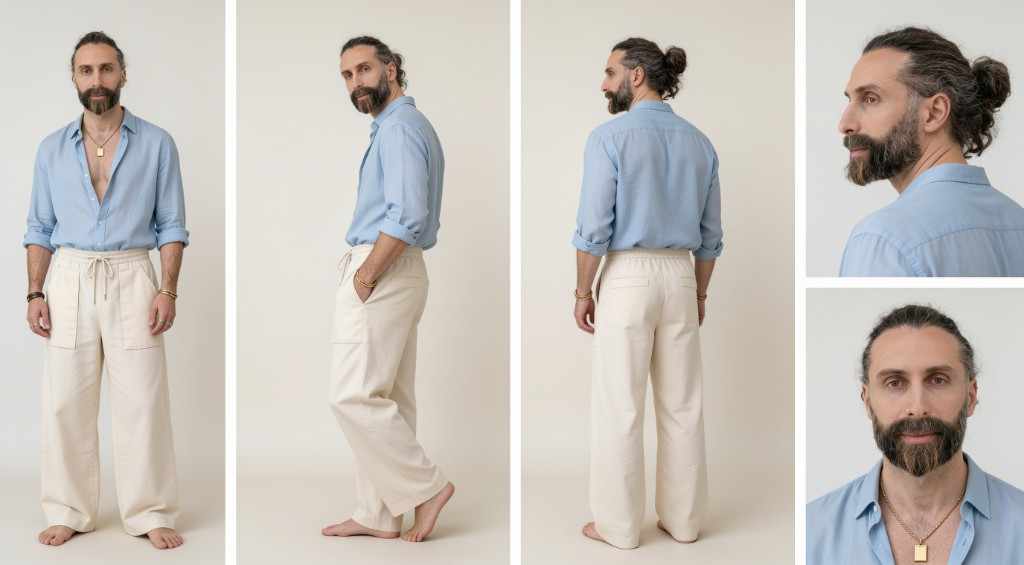
That sheet is the thing I keep. Front, three-quarter, back, profile, and a waist-up portrait give the identity lock enough coverage that later shots have something to agree with.
Two details decide whether a board is usable:
- Number the panels and state the rotation. “Front, side, back, portrait” as a comma list tends to collapse into four near-identical front views. “Panel 3: full-body back view, head turned over the shoulder” does not.
- Name the outfit in every panel, including the close-up. The smallest panel has the least garment in frame, so it quietly falls back to whatever the identity reference was wearing. A waist-up crop that mentions the open collar and the pendant holds; a head-and-shoulders crop that mentions only the face does not.
One counterintuitive part: do not write prohibitions naming clothes. Image models have no reliable negation, so “no different collar” is mostly the word collar handed to the model with emphasis. Describe what is worn, once, and leave it unopposed.
Outfit changes are look cards, not edits to the default Character. Baking every wardrobe into the identity lock is how hair and clothes start wandering with the scene.
I also keep a tiny local bible in Markdown next to the project: name, hair, default clothes, photoreal vs illustrated, and a short “do not change” list. That file is for me and for tools that read the repo. It is not a substitute for the Character in the generator.
Stills first, then motion
Video cannot rescue a face that already drifted in the stills. I learned that the expensive way on a music-video clip: if the portraits disagree, the motion model has nothing honest to hold.
The checkpoint is deliberately boring. Three stills, different settings, same @Name, no face rewrite. I keep the winners. Everything else is trash, including “almost.”
Only then: image-to-video from an approved still. Short clips — five to eight seconds — and gentle camera. If the face holds, I grab the last sharp frame and start the next clip from that frame, same Character tag. I regenerate the shot that slipped. I do not average two morphs into a new “reference.”
OpenArt’s own write-up of consistent characters across video scenes is the same shape: bind identity, then describe action and camera.
A prompt after the lock looks like this (pattern, not a magic spell):
@Maya walks slowly through a rainy Tokyo alley at night.
She glances up at a neon sign, then continues forward.
Cinematic medium tracking shot, shallow depth of field,
wet asphalt reflections, cool cyan and magenta neon,
subtle handheld feel, natural motion, no morphing face,
same outfit throughout.
When a model has no @Character slot, I paste a short identity block instead of a novel: face, hair, age, one wardrobe line, then the shot. Verbatim across takes. Rewording the block is how cousins sneak back in.
What stays locked
| Lock | Vary |
|---|---|
| Face, hair, apparent age | Location and lighting |
| Default body cues | Action, emotion, props |
| Default outfit, until I switch look cards | Camera size and move |
| Overall style (photoreal vs illustrated) | Temporary weather, signage, extras |
Mixing a photoreal Character with an illustrated style, or describing clothes that fight an outfit reference, is a style fight. The model will pick a winner. It usually is not the face you meant.
Where this stops
This is a working plan, not a guarantee. Models change. @Character support is not identical on every image and video picker, and I re-check the in-app list rather than treating a blog post as a driver table. Extreme motion, tight close-ups, and long takes still morph; shortening the clip is cheaper than arguing with the prompt.
The rule that actually holds: never put a drifted frame back into the library. Consistency is a filter. If shot two is a cousin, that cousin does not become the new hero.